Local time in a UTC timing mesh
Power up a time mesh wherever you need one. Give people the local time they expect and devices the shared UTC reference they need.
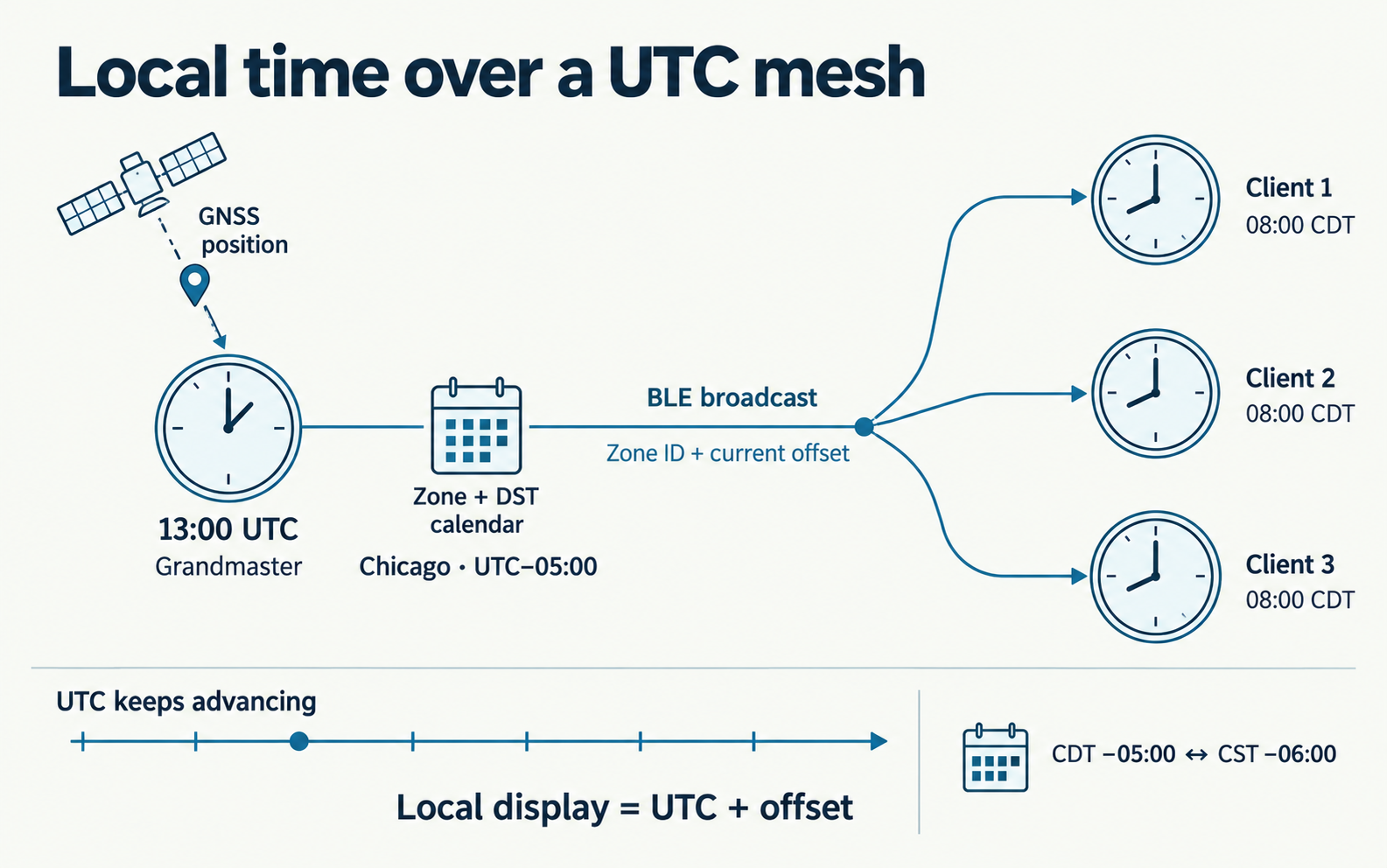
Our aim is an instant precision time mesh: bring the reference, power up your clients, and let the network share time. A workshop, a temporary lab or a field installation should be able to use the same straightforward setup. Once the grandmaster has a valid reference, clocks and sensors can join it without each needing their own GNSS receiver or Internet time service.
Local timezone support makes that experience more useful. The clock on the wall should show the hour people expect, while the instruments beside it record events against one shared UTC reference. Moving the installation or crossing a daylight saving boundary should not turn into a round of clock configuration.
Local time without configuring every clock
A precision mesh can put a common time reference within reach of small, inexpensive devices. To make it convenient in everyday use, we also need to take care of the ordinary clock-setting work: choosing a region, applying its offset and following its seasonal changes.
PToB will put those decisions at the grandmaster. Its GNSS position will select a supported region from a compact geographic database, and that region’s calendar will supply the current UTC offset. The grandmaster will distribute the result over Bluetooth; clients and relays will inherit it through the mesh.
That means one local-time policy for the installation. A new clock can receive the same setting as the clocks already around it. Receivers will need neither a geographic database nor an Internet lookup, keeping the work small enough for simple microcontrollers.
UTC stays the foundation
Timezone support builds on our decision to standardize PToB on UTC. In that article, we discussed International Atomic Time (TAI), the Precision Time Protocol (PTP), and why supplying UTC directly makes life simpler for small clients. TAI conversion and PTP interoperability belong at the interfaces that need them, with the appropriate time properties.
Local time follows the same principle: apply the conversion where it is needed. Clock faces will add the regional offset for display. Event timestamps, precision timing, PPS and USB time output will keep their existing time coordinates. Selecting a timezone will not reset the mesh epoch or change the precision clock model.
This matters when local time repeats in autumn or skips an hour in spring. Operators can see the familiar local clock change while logs and measurements retain their common UTC reference. We can make the mesh comfortable to use without moving its timing foundation every time the clocks change.
A setup that can move with you
The design is intended to travel with the equipment. In regions covered by automatic selection, fresh GNSS positions will establish the local zone. A manual zone will let an installation choose its calendar explicitly, and a fixed offset will serve deployments that need a particular convention. Receivers will follow the serving grandmaster’s zone, including clients physically elsewhere.
The over-the-air addition is just four bytes: a zone identifier and the current offset in minutes. The regional calendars stay at the GM. When daylight saving changes the offset, fresh authenticated broadcasts will carry the new value to clients. The precision timing payloads stay unchanged.
Automatic geography will cover selected regions; manual choices provide the alternative elsewhere. If a usable zone cannot be established, its calendar expires or its radio metadata becomes stale, clock presentation will return to UTC. The shared time reference remains useful even when a local-time setting is unavailable.
The experience we want is simple: set up a precision time mesh wherever the work takes you, let its clocks show useful local time, and keep every device working from the same UTC base.