The precision clock hiding in every USB port
Most computers already have the connector. We set out to learn how much time it can carry, and found questions worth a closer look.
Plug a GPS receiver into a computer over USB and ask a timing enthusiast how good its time will be. The usual answer is: not very. Data from a USB serial adapter arrives whenever the host gets around to collecting it, and a pulse-per-second (PPS) signal routed that way is often quoted with around a millisecond of uncertainty. For serious timing, the advice goes, use a dedicated pin.
That advice is about packets. USB has another signal that gets far less attention: a steady beat that the host sends to every device on the bus. We wanted to know how much time that beat can carry. Early experiments on a Mac and a Raspberry Pi suggest it could be a great deal more than USB’s reputation allows.
USB keeps a steady beat
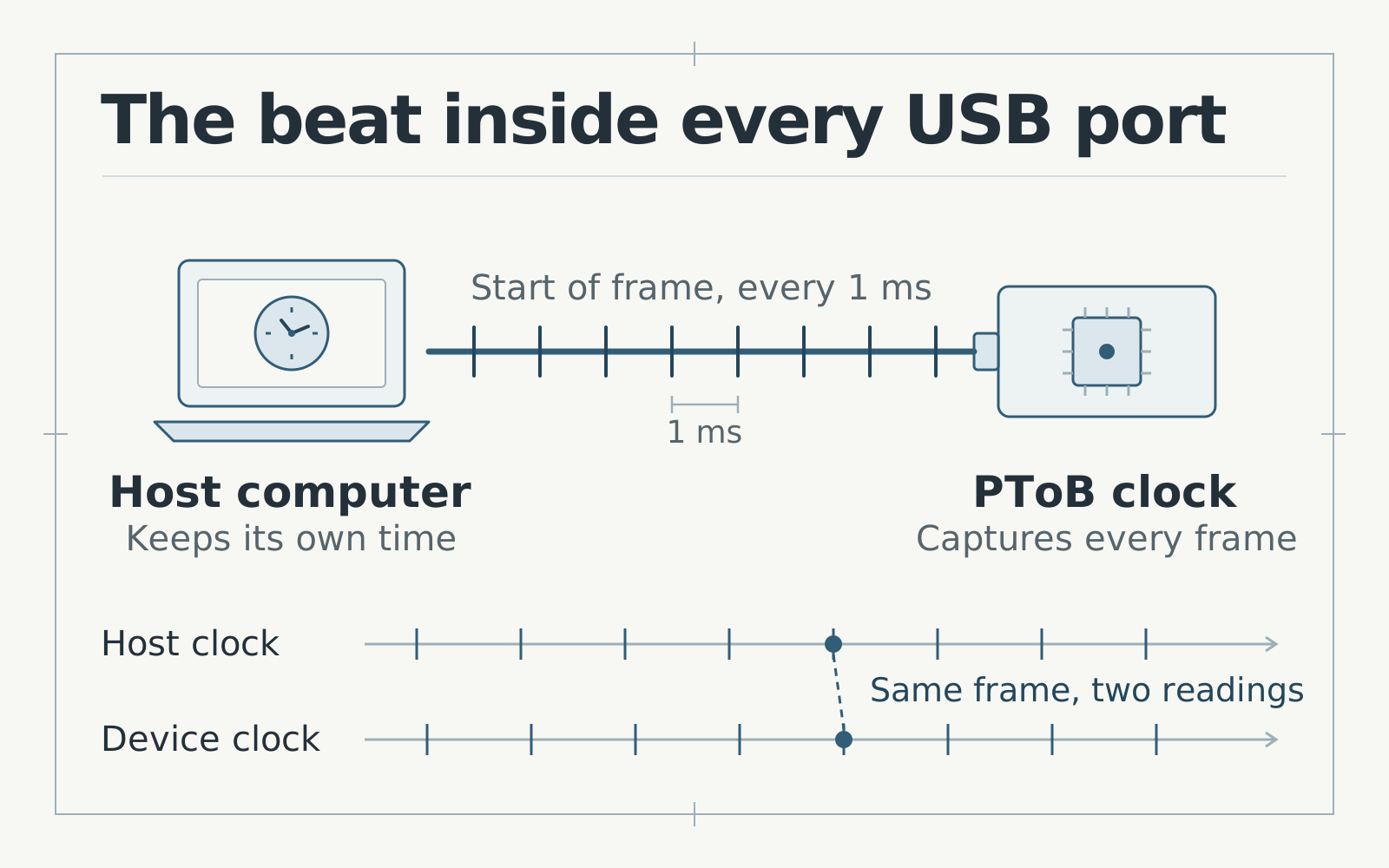
A full-speed USB host divides time into 1 ms frames. At the start of each one it sends a short, numbered start-of-frame marker to every device on the bus. The USB 2.0 specification defines this schedule. Data packets travel inside those frames when the host is ready to send or collect them, so their arrival times wander. The frame markers themselves keep to the schedule.
Think of a railway station. Passengers turn up whenever they turn up, but the station clock ticks for everyone on the platform. If you want the time, you look at the clock rather than the passengers.
The nRF52840 inside our T096 clocks can capture each start-of-frame marker in hardware, without waiting for its software to notice. Nordic’s USB peripheral signals the frame, and a timer records the clock’s own tick at that instant. If the host can also say when the same numbered frame began on its clock, the two readings describe one moment from both sides.
Collect enough of those pairs and you can convert readings between the two clocks, much as our Bluetooth receivers do with radio events. The 1 ms spacing then stops limiting precision. Each pair marks a precise moment, and the frames supply a steady stream of them.
A first look on a Mac
macOS lets software ask which frame the bus is on and when that frame began on the Mac’s own high-resolution clock. Our experimental Mac client uses that answer to pair frames with a PToB clock. It then feeds the result to a private copy of chrony and leaves the system clock alone.
In a three-minute window in October, two PToB clocks sharing one USB bus on the same Mac reached a few hundred nanoseconds. For the two clocks, the Mac predicted each new frame observation with errors of about 190 and 270 nanoseconds RMS. That is a long way from the milliseconds USB timing is usually associated with. The Mac study explains how each figure was measured.
There was a catch. Everything we compared on the Mac came from the same source. It could show how consistent the chain was, but not whether something along the way had shifted every reading together. We needed a second opinion.
A second opinion from a Raspberry Pi
A Raspberry Pi 5 gave us a way to get one. We connected a PToB clock to the Pi over USB and tried the same frame-matching idea there. That clock and the nRF52 HAT on the Pi both followed the same grandmaster over Bluetooth, and the HAT turns its time into a PPS signal on a GPIO pin. That gave the Pi two separate roads from one reference clock.
Each road compares the reference with the Pi’s clock, but from opposite directions. The USB road measures the reference minus the Pi. The PPS road measures the Pi minus the reference. If the Pi’s clock drifts, both roads see the same movement with opposite signs. Add the two results and the Pi’s own wander cancels, leaving only how well the roads agree with each other.
The result surprised us. On its own, each road appeared to wobble by about 7 microseconds RMS. The two wobbled as near mirror images, with a correlation of 0.99, so most of what looked like transport error was the Pi’s clock moving underneath both measurements. With that shared motion removed, the USB and PPS roads agreed to about 1.1 microseconds RMS over 280 matched seconds. The selected results explain how this exploratory run was measured and what it cannot show.
A second measurement pointed the same way. The Pi 5’s RP1 chip has small programmable I/O state machines that can time a pin on their own clock, without waiting for Linux. Raspberry Pi’s piolib makes them available to ordinary programs. Timed that way, the one-second period of the PPS pulse varied by about 43 nanoseconds in a one-minute window. Linux’s interrupt timestamps for the same pulses varied by about 830 nanoseconds.
Much of the noise, in other words, lives in how the host listens rather than in the signal itself. That is encouraging for USB. The frame markers may already be steadier than the clocks we currently use to read them.
Why USB timing could be worth it
Most computers have no PPS pin. Laptops and desktops rarely expose one, and network cards with hardware timestamping can cost far more than the clocks they would serve. Nearly every computer has USB.
If frame-matched time holds up, a small and inexpensive clock could plug into whatever host is nearby: a laptop on a lab bench, a single-board computer in a sensor rack, a recording rig that needs audio and video aligned, a software-defined radio or a robot’s main computer. That computer could then pass the time on to the rest of a network over NTP or PTP, the role our Pi gateway already explores through its PPS pin.
Questions worth the next round of research
Our runs so far are short and early. They measure relative timing, meaning how well clocks agree with a shared reference, rather than how close any of them is to UTC. These are the questions we would most like to answer next.
- Can Linux see frames as clearly as macOS? We could not find a Linux equivalent of the Mac’s frame-time query in the USB host-side API. On the Pi, we estimate frame timing from repeated reads of the host controller’s frame counter, which costs precision. A small kernel interface could close that gap.
- Can both ends always agree on the frame? A small number of Pi observations close to a frame boundary did not line up as expected. Settling exactly which frame each side saw is the foundation for everything else.
- What would an outside judge say? Comparing the delivered time with an independent reference, such as a time-interval counter and a GNSS-disciplined pulse, would reveal fixed offsets that comparing two roads from one clock cannot.
- How far does it reach across the USB world? Hubs, high-speed devices with their 125 µs microframes, Windows and Android hosts, and other microcontrollers that can capture frames all deserve a look.
- How does it behave over days? Long runs would test reconnects, sleep and resume, and busy buses.
USB is often the first interface people rule out for timing. These early results suggest it deserves another look. If you have a time-interval counter, an unusual USB host or experience with the Linux USB stack, we would love to compare notes. The Mac study, the Pi gateway tools and the Mac client source are good places to start.